ABCmouse: Kids Learning Games
- 4.5
- Rating
- 5.00M
- Installs
- Free
- Price

 Analysis by App-foxy
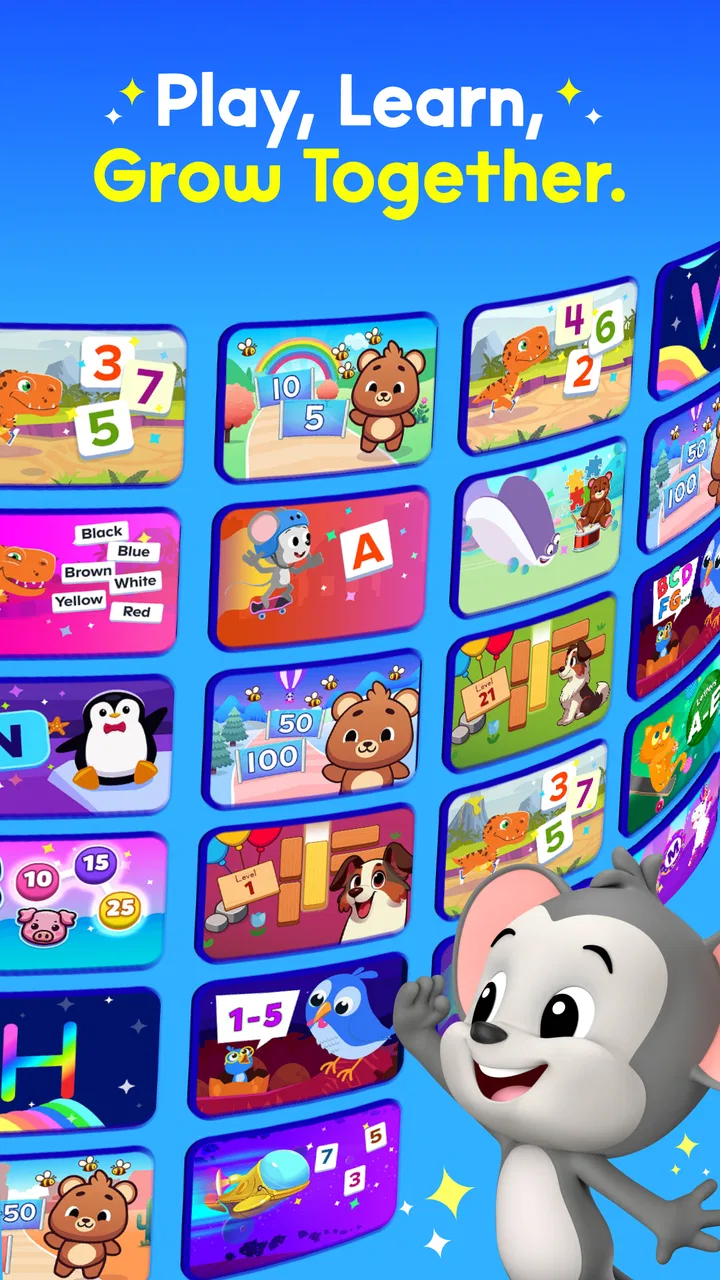
I approached ABCmouse: Kids Learning Games as a parent would: not just asking whether it looks colorful, but whether it can hold a child’s attention, support useful practice, and fit into an ordinary day without becoming another chore to manage. My impression is that this is a broad education app rather than a single-subject tutor. It brings reading, math, science, art, music, and other learning activities into one child-friendly space, which makes it appealing when you want variety without switching between several apps.
It is published by Age of Learning, Inc. and sits in the Education category. The app is free to install, with optional in-app purchases ranging from $3.99 to $104.99 per item. That distinction matters: families can explore the starting experience without paying immediately, but the full value depends on which content or access options are available inside the app. I would treat the free download as an opportunity to test the teaching style and navigation before making a longer-term commitment.
The current listing shows a 4.6 average from around 13,000 ratings, with more than 1M installs. Those figures suggest that the app has reached a substantial audience, but they do not replace a child’s personal reaction. Some children enjoy moving between subjects and activities; others learn better with a quieter, more focused tool. The content rating is Everyone, which fits its intended family setting, although younger children may still need an adult nearby for setup and routine.
You May Also Like

 Blood Strike: 2.5 Anniversary
Blood Strike’s Loadouts Turn Every Drop Into a Tactical Gamble
A close look at Blood Strike’s custom loadouts: how fast access to signature weapons reshapes its battle royale rhythm, rewards preparation, and narrows the gap between fights.

 Pandora - Music & Podcasts
Pandora’s Music Is Easy to Start, but Harder to Recover
Pandora’s strength is its low-effort path from a seed to a station. Its weak spot is how much confidence it asks you to place in connection, setup, and quiet recovery.

 8 Ball Pool
 Is Built on Rivalries, Rematches, and Routine
A close look at the rivalries, rematches, shared routines, and unanswered safety questions that turn a quick pool match into a persistent mobile community.

 Samsung Music
’s Quiet Strength Is Playing What You Already Own
Its reach comes less from spectacle than from dependable access to a personal library. That simplicity is both the app’s strongest retention engine and its ceiling.

 AccuWeather: Weather Radar
AccuWeather Review: A Quick, Clear Forecast for Everyday Decisions
For everyday plans, the best forecast is the one you can understand quickly. AccuWeather makes rain timing, radar, and local conditions easy to act on, with a few trade-offs.

 Hill Climb Racing
Why Hill Climb Racing Still Turns Crashes Into One More Run
A tiny car, a bumpy hill and one more upgrade: Hill Climb Racing keeps resurfacing because its simple chaos makes every near-miss feel personal.
More From Our News Desk



How the current ABCmouse experience works in everyday use
I find that the most useful way to judge ABCmouse in a shared household is to look beyond whether each child can open an activity: the real test is whether a session stays purposeful when the device is passed around. I’d start by agreeing on whose turn it is and what each child hopes to practice, then consider how that simple routine shapes setup and boundaries.
A wide learning space instead of a single lesson path
The strongest part of ABCmouse is its range. A child can move from early reading practice to number work, then explore a science activity or spend time with art and music. That variety is useful when attention is unpredictable. If my child is tired of letter sounds, I can redirect the session toward a different subject without abandoning the learning goal entirely.
At the same time, breadth creates a decision problem. A large library can feel exciting to an adult, but a young learner may simply tap whatever looks most colorful. I found that the app works better when I begin with a small intention: read for a few minutes, practice counting, or try one creative activity. Giving a child unlimited choice sounds flexible, but a short menu often produces a calmer and more purposeful session.
The advertised library contains over 13,000 educational activities, covering the main subjects families expect from an early-learning platform. I would not interpret that number as a promise that every activity will suit every age or ability. The practical value comes from finding a manageable sequence inside the larger collection, rather than trying to consume the entire catalog.
Why the format can suit short daily routines
ABCmouse is most convincing as a regular habit, not as a substitute for school or a last-minute attempt to repair every learning gap. A brief session after breakfast, during a quiet afternoon, or before another screen activity can give a child repeated contact with basic concepts. The mix of interactive tasks and creative subjects also makes it easier to avoid the feeling that every visit is a worksheet.
A realistic routine might look like this: I would let a child choose between two activities, complete one reading task, and then finish with art or music as a lighter transition. The important detail is stopping while the child still has some interest. Extending a session simply because more activities are available can turn a useful tool into a source of resistance.
This approach also helps parents observe learning behavior. A child who rushes through reading but spends time correcting a counting task may need encouragement with patience rather than more content. A child who avoids science may respond better when the subject follows a preferred creative activity. The app becomes more useful when I treat the activity choices as clues about motivation, not just entertainment options.
Navigation and independence
For children who can already recognize familiar icons and follow simple instructions, the broad design can support a growing sense of independence. They can make choices and return to areas they recognize instead of waiting for an adult to open every lesson. That is a meaningful advantage over printed worksheets, where the parent often controls the entire sequence.
Independence should not be confused with complete self-management. Younger children may still need help understanding what an activity is asking, especially when they tap through instructions quickly. I would stay close during the first few sessions, then gradually step back once I know which areas the child can handle alone. This also reduces the chance that the child spends the whole session browsing rather than learning.
One useful habit is to ask the child to explain what they did after finishing. That small conversation reveals more than a completed screen: it shows whether the child understood the idea, guessed, or simply followed visual cues. It also makes the app part of a wider learning routine instead of an isolated digital reward.
What the app is particularly good at
Its best use case is a household that wants one familiar learning environment for several early subjects. Rather than maintaining separate reading, math, art, and music apps, I can return to one recognizable place and adjust the activity to the child’s mood. That convenience is especially helpful for families with limited time or more than one child at different stages.
The cross-subject design is also helpful when a child needs a change of pace. Reading may require concentration, while art or music can provide a creative reset. I would not call that a replacement for focused instruction, but it can make a home learning routine easier to sustain than a schedule built entirely around drills.
Another strength is the possibility of using the app as a bridge between guided and independent practice. I can introduce a topic away from the screen, let the child try a related activity, and then talk about it afterward. For example, a simple conversation about shapes or sounds can make the digital task feel connected to real life rather than disconnected tapping.
Where it may not be the right choice
I would hesitate to choose ABCmouse as the main tool for a child who needs highly specialized intervention, intensive one-to-one feedback, or a very narrow curriculum. A broad activity library can offer practice, but it cannot replace a teacher, therapist, or tailored plan when a child has significant learning needs.
It may also be a poor fit for children who become overstimulated by frequent choices or bright, game-like presentation. In that situation, a simple reading app, a small collection of printable exercises, or direct practice with an adult may work better. More content is not automatically better content for a particular learner.
Families should also think carefully about the purchase model. The app itself is free, but optional purchases can range from a few dollars to more than one hundred dollars per item. I would review the available access choices slowly, avoid making a decision while a child is watching, and consider whether the intended routine justifies the expense. The correct question is not whether the catalog is large; it is whether the child will return to the parts that matter.
How it compares with ordinary alternatives
Compared with a single-subject reading app, ABCmouse offers more variety but may provide less depth in one specific skill. A dedicated phonics tool can be preferable when the immediate goal is systematic sound practice. In contrast, ABCmouse makes more sense when the family wants reading to sit alongside math, science, art, and music in the same general environment.
Compared with worksheets, the app is more interactive and easier to vary from one day to the next. Worksheets still have advantages: they encourage pencil control, make work easy to inspect, and do not compete with other screen distractions. I would use both rather than treating them as rivals. A short digital activity followed by drawing, writing, sorting objects, or talking through an answer can create a more balanced experience.
Compared with videos, ABCmouse asks the child to participate more actively. That does not mean every activity produces deep understanding, but interactive choices can reveal whether the child is following along. Videos are convenient for explanation; the app is more useful when the child needs to respond, practice, and make decisions.
What the current version tells existing users
The current version is 1.52.0, and the app was released on February 14, 2025. Those details place the present experience in a relatively recent stage of the product’s life. I see that as a reason to judge the app by how well its current learning environment works today, rather than assuming that an older impression or a familiar brand name tells the whole story.
For someone already using ABCmouse, a version change is most meaningful when it improves the everyday path through activities: clearer movement, dependable access, and a smoother transition between subjects. I would pay attention to whether a child can resume a routine without confusion and whether adults can quickly find suitable activities. Those practical details affect continued use more than a new visual flourish.
For a new family, the current version is a good moment to establish a simple baseline. Try the same type of session several times, note which subjects the child chooses, and see whether the child can explain what was learned. That gives a better measure of fit than judging the app after one exciting first visit.
Remaining friction for parents and children
The biggest limitation is the amount of supervision required at the beginning. A child may be able to operate the interface but still lack the reading ability, patience, or judgment to choose productive activities. Parents should expect an orientation period, not instant independence.
The other friction is managing abundance. A large collection can make progress feel less visible if the child jumps randomly between topics. I recommend setting a tiny goal for each visit and keeping a note of what was attempted. Even a handwritten record such as “reading today, math tomorrow” can prevent the experience from becoming a stream of unrelated taps.
Screen balance is another consideration. Because the app combines many subjects and activities, it can be tempting to extend the session. I would decide the stopping point before opening it. Ending at a planned time is easier than negotiating after a child has started another activity, and it keeps ABCmouse in the role of a learning aid rather than the default answer to boredom.
What I would watch before committing
I would watch for three things over the first couple of weeks: whether the child returns willingly, whether the chosen activities match the intended learning goal, and whether the adult workload remains reasonable. A child enjoying the app is important, but enjoyment alone is not enough if the sessions never reach reading or math practice.
I would also watch how the purchase options fit actual use. Since the app is free to download but includes paid items, families should decide based on repeated behavior rather than the size of the catalog. If a child consistently uses a small set of activities, that pattern is more useful than a promise to explore everything eventually.
Finally, I would watch for signs that a different format is needed. If the child is guessing, avoiding a subject, or becoming frustrated, I would pause the app and try direct explanation, physical materials, or a more focused resource. ABCmouse is most effective when it supports attentive learning, not when it is asked to solve every problem by itself.
My recommendation for families
After reviewing the app as a complete learning environment, I see it as a flexible option for families who want variety and are willing to guide the experience. Its combination of reading, math, science, art, music, and other activities gives it more range than a narrowly focused practice app. The free starting point also makes it reasonable to test the approach before considering optional purchases.
I would recommend it to parents of young learners who can create a short routine, check in during early sessions, and connect digital activities with conversation or hands-on practice. I would be less enthusiastic for families looking for a fully self-directed tutor, a specialist intervention, or a quiet, minimalist learning tool.
My final view is positive but practical: ABCmouse works best when the parent supplies the structure and the app supplies the variety. Used that way, it can make regular learning feel less repetitive and give children several ways to stay engaged. If you expect the app alone to organize progress, teach every concept deeply, and remove the need for adult involvement, it will probably disappoint. If you use it as one thoughtfully chosen part of a child’s learning day, it has a lot to offer.
FAQs for ABCmouse: Kids Learning Games
01What age group is ABCmouse suitable for?
ABCmouse is designed for children aged 2 to 8 years old. The app offers a wide range of educational activities that cater to different developmental stages, ensuring that both toddlers and early elementary students can benefit from its content. Each age group can access tailored lessons to suit their learning needs.
02Does ABCmouse require an internet connection to function?
While ABCmouse can be partially used offline, an internet connection is required to access the full range of features and content updates. Some lessons and games can be downloaded for offline use, but to maintain the app's functionality and keep it updated, regular internet access is recommended.
03Is there a subscription fee for ABCmouse?
Yes, ABCmouse operates on a subscription model. While there are free trials available, continued access to the full suite of educational activities requires a paid subscription. The app offers various pricing plans, including monthly and annual options, to fit different budgets and needs.
04How does ABCmouse ensure my child's progress is tracked?
ABCmouse provides a comprehensive progress tracker for both parents and children. The app includes tools to monitor completed activities, assess learning milestones, and identify areas needing more focus. Parents can receive detailed reports, making it easier to understand their child's learning journey.
05What subjects does ABCmouse cover?
ABCmouse covers a wide array of subjects, including reading, math, science, and art. The app is structured to provide a balanced educational experience, offering lessons and activities that develop literacy, numeracy, and creative skills. Each subject is tailored to fit different learning levels, ensuring comprehensive coverage.
Pros
- Engaging educational content for kids.
- Wide range of subjects covered.
- Interactive and fun learning games.
- Easy to navigate for young users.
- Progress tracking for parents.
Cons
- Requires subscription for full access.
- Can be repetitive over time.
- Limited offline access.
- Some content may need adult supervision.
- May not suit all learning styles.

ABCmouse: Kids Learning Games
Gallery